Draw your AWS infrastructure.
Export Terraform.
Design cloud architecture visually — drag resources, connect edges, deploy.Every new account starts with a 7-day Platform trial. No credit card required.
How it works
From diagram to deploy in minutes
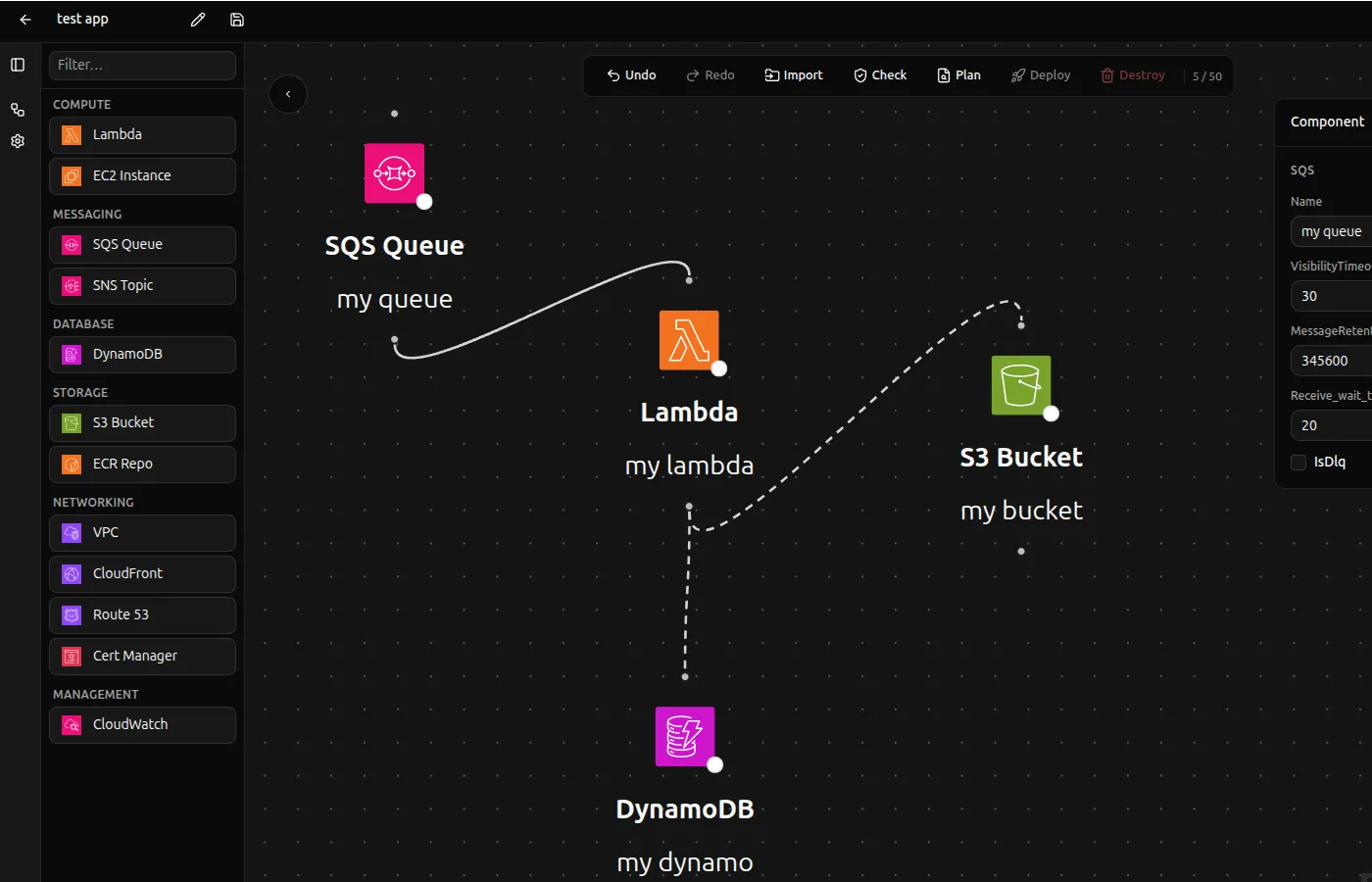
Draw your architecture
Drag AWS resources onto the canvas — Lambda, SQS, DynamoDB, S3, EC2, CloudFront, and more. Connect them with edges that map to real AWS relationships: event triggers, IAM permissions, DNS aliases.
Export valid Terraform
One click generates a production-ready ZIP with main.tf, variables.tf, locals.tf, and per-environment .tfvars files. Resource names are env-suffixed automatically. No cleanup required.
Deploy and verify
Hit Deploy and watch terraform plan stream in real time inside the app. Then run an architecture check to compare your diagram against live AWS — see what's in sync and what has drifted.

Features
Everything you need to ship AWS infrastructure
Purpose-built for engineers who think in diagrams, not syntax.
Visual-first design
No YAML. No JSON. No fighting indentation. Draw what you mean — Kodepad writes the HCL. Every connection becomes a real Terraform resource.
Multi-environment support
Define variables once, override per environment or region. Stage, prod, us-east-1, eu-west-1 — Kodepad resolves the right values at export time.
AWS import
Point Kodepad at your AWS account and it reconstructs your existing architecture on the canvas. Lambda, SQS, DynamoDB, VPCs, EC2, CloudFront, and more.
Drift detection
Run an architecture check to compare your diagram against live AWS resources. Per-node and per-edge status — see what's missing, changed, or in sync.
Live deploy
Hit Deploy and watch terraform plan stream in real time directly in the app. Full visibility into what's changing before it happens.
Snapshot history
Every save creates a snapshot. Navigate architecture history, compare states, and restore any previous version without losing current work.
Variable bindings
Bind named variables to node and edge fields. Override per environment, region, or both. Supports string interpolation with ${env} and ${region}.
IAM-ready output
Edge compilers emit the right IAM role policies automatically. Event source mappings include the permissions AWS actually requires — no silent deploy failures.
Zero lock-in
Standard HCL output — no proprietary wrappers, no custom providers. You own the files and can manage them with any toolchain.
Supported resources
10 resource types. Every major edge.
Pricing
Start free. Scale when you need to.
Every new account gets a 7-day Platform trial — no credit card required.
- ✓ 1 project
- ✓ 10 elements per diagram
- ✓ 2 snapshots (undo history)
- ✓ 1 environment
- ✓ Terraform export (ZIP)
- ✕ Deploy / destroy
- ✕ AWS import
- ✕ Drift detection
- ✓ 3 projects
- ✓ 25 elements per diagram
- ✓ 5 snapshots
- ✓ 2 environments
- ✓ Terraform export (ZIP)
- ✓ Deploy / destroy
- ✓ Variable bindings
- ✓ In-app terminal
- ✕ AWS import
- ✕ Drift detection
- ✓ 5 projects
- ✓ 50 elements per diagram
- ✓ 5 snapshots
- ✓ 3 environments
- ✓ Terraform export (ZIP)
- ✓ Deploy / destroy
- ✓ Variable bindings
- ✓ AWS import (10 types)
- ✓ Drift detection
- ✓ Architecture check
- ✓ Unlimited projects
- ✓ Unlimited elements
- ✓ Everything in Platform
- ✓ Team workspaces
- ✓ Shared diagrams
- ✓ Role-based access
- ✓ Everything in Business
- ✓ SSO / SAML
- ✓ SLA guarantee
- ✓ Dedicated support
- ✓ Custom onboarding
- ✓ Audit logs
FAQ
Frequently asked questions
Do I need to know Terraform to use Kodepad?
No. Kodepad is designed so you can draw a diagram and get working Terraform without writing a single line of HCL. If you already know Terraform, the output is clean and readable — you can edit it freely after export.
Which AWS resources are supported?
Lambda, SQS, DynamoDB, S3, EC2, VPC, CloudFront, Route 53, ACM, and ECR. Edge types cover event source mappings, IAM permissions, S3 notifications, CloudFront origins, DNS records, TLS certificates, and more.
How does AWS import work?
Kodepad connects to your AWS account using your credentials, reads live resources via the AWS SDK, and reconstructs them as nodes and edges on the canvas. VPCs are imported as group nodes with EC2 instances placed inside automatically.
Is the generated Terraform production-ready?
Yes. Kodepad emits valid HCL that passes terraform validate and can be applied directly. It handles resource naming, IAM role policies, event source mappings, and multi-environment variable resolution — the same patterns engineers write by hand.
What is the difference between Free and Pro?
Free is great for learning and small experiments: 1 project, 10 elements, Terraform export. Pro unlocks everything needed for real infrastructure work: unlimited projects, multi-environment configs, AWS import, drift detection, and live deploy/destroy.
Can I edit the Terraform output manually?
Absolutely. The exported ZIP contains standard HCL files with no proprietary wrappers. You can open them in any editor, use them with Terraform Cloud, Atlantis, or any other workflow. Zero lock-in.
Your next AWS architecture is one diagram away.
Join engineers who'd rather draw than write 300 lines of Terraform from scratch.